
As an Amazon Associate, we earn from qualifying purchases. This helps support the site at no extra cost to you.
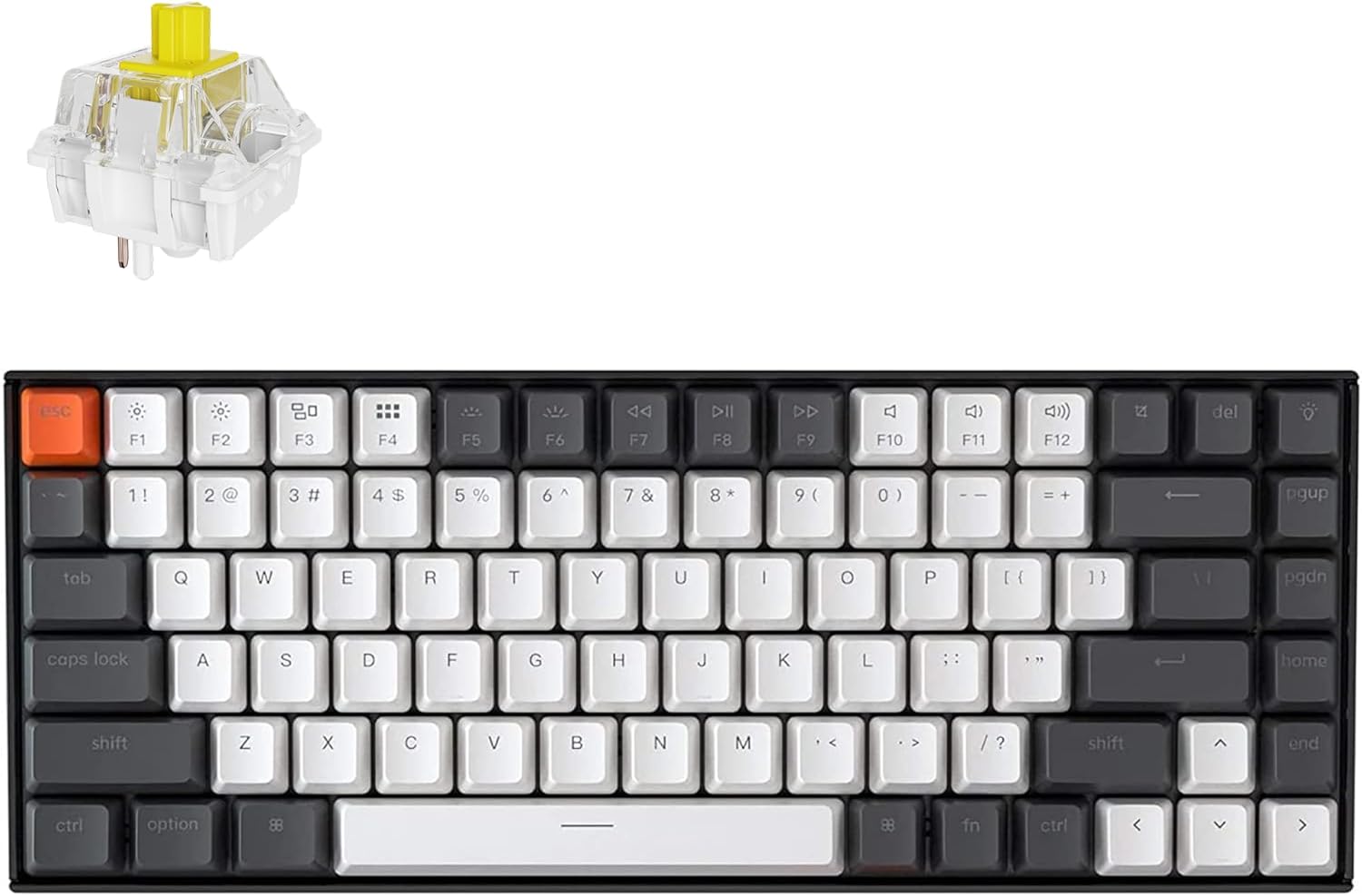
Quick Answer: The Keychron K2 ($89.99) is one of the best mechanical keyboards for home office use in 2026. It combines a compact 75% layout, wireless Bluetooth, hot-swappable switches, and Mac/Windows compatibility in a single package. If you’ve been typing on a mushy membrane keyboard, the K2 will feel like an upgrade from day one. Our rating: 9/10.
The Keychron K2 has been a top recommendation in r/MechanicalKeyboards and r/homeoffice for years — and for good reason. It hits a rare sweet spot: compact enough to free up desk space, wireless enough to reduce cable clutter, and customizable enough to actually be fun to type on. At $89.99, it’s not the cheapest option, but it’s one of the best values in the mechanical keyboard market.
We break down everything you need to know before buying.
Keychron K2 — Quick Specs
| Spec | Detail |
|---|---|
| Price | $89.99 |
| Layout | 75% (84 keys) |
| Connectivity | Bluetooth 5.1 / USB-C wired |
| Switch type | Hot-swappable (Super Banana in this version) |
| Backlighting | White LED |
| Battery | 4,000 mAh |
| Compatible with | Mac, Windows, iOS, Android |
| Keycaps | Double-shot PBT |
| Amazon rating | ⭐ 4.6/5 |
| Our rating | ⭐ 9/10 |
👉 Check current price on Amazon →
What Makes the Keychron K2 Stand Out
1. The 75% Layout Is the Sweet Spot for Desk Space
Full-size keyboards are desk hogs. Tenkeyless keyboards save some space but still feel big. The 75% layout on the K2 removes the number pad and condenses everything else — you keep arrow keys, function row, and all the essential keys, but the footprint shrinks significantly. For home office setups where desk space is limited, this matters.
The 84-key layout means you’re not giving up any keys you actually use regularly. Delete, Page Up, Page Down, Home, End — they’re all there, just tighter together. It takes about two days to fully adjust if you’re coming from a full-size board.
2. Hot-Swappable Switches — No Soldering Required
This is the feature that separates the K2 from most keyboards in its price range. Hot-swappable means you can pull out any switch and replace it with a different one — no soldering iron, no technical skills needed. If you buy the K2 with Super Banana switches and decide you’d prefer something quieter or heavier, you can swap every switch in 30 minutes with a switch puller tool.
For a first mechanical keyboard, this is huge. You’re not locked into one switch type for the life of the board. You can experiment as you learn what you actually like.
3. Bluetooth + USB-C — Genuinely Useful Dual Mode
The K2 connects to up to three devices via Bluetooth and switches between them with a keyboard shortcut. If you work on a laptop, a desktop, and occasionally an iPad, you can use one keyboard for all three without unplugging anything. USB-C wired mode is always there if you need zero-latency typing or your battery runs low.
Battery life is impressive — the 4,000 mAh battery lasts roughly 2–3 weeks of daily use with the backlight on, longer with it off.
4. Double-Shot PBT Keycaps That Won’t Shine
Cheap keyboards use ABS keycaps that develop a greasy shine after a few months of heavy use. The K2 uses double-shot PBT keycaps — a denser plastic that resists shine and feels better under your fingers. The legends (the letters and symbols) are injection-molded rather than printed, so they won’t fade or rub off over time.
What We’d Improve
No keyboard is perfect. Here’s what to know before you buy:
- No RGB in this version — The white LED backlight is clean but if you want per-key RGB lighting, you’ll need the RGB version of the K2 (slightly more expensive).
- Bluetooth can have minor latency — For typing it’s imperceptible. For gaming, use USB-C wired mode instead.
- No wrist rest included — The K2 has a slight incline. If you type for long hours, add a wrist rest ($10–20 on Amazon). It makes a noticeable difference in comfort.
- Sound can be loud depending on switches — Super Banana switches are tactile with a noticeable bump. If you’re in an open office or on video calls often, consider foam dampening or silent switches.
Who Should Buy the Keychron K2?
- Remote workers who type for hours daily and want something better than a stock membrane keyboard
- Mac users — Keychron keyboards have dedicated Mac layouts with proper Command/Option keys, which most mechanical keyboards don’t
- Anyone who wants to try mechanical keyboards without spending $150+ on a first board
- Multi-device users who want one keyboard for laptop + desktop + tablet
Who Should Skip It?
- Gamers who need zero-latency wireless (look at the Keychron Q or Wooting instead)
- People who need a number pad — the 75% layout doesn’t have one
- Budget shoppers under $50 — the Redragon K552 is decent at $35, though quality is noticeably lower
Frequently Asked Questions
Is the Keychron K2 good for office work?
Yes — it’s one of the most recommended keyboards in home office communities specifically because of its compact layout, wireless connectivity, and Mac/Windows compatibility. The typing experience is significantly better than any membrane keyboard in the same price range.
What are Super Banana switches like to type on?
Super Banana switches are tactile — you feel a noticeable bump when each key actuates, which gives satisfying feedback without bottoming out on every keystroke. They’re louder than linear switches (like Red) but quieter than clicky switches (like Blue). For home office use they’re a good default choice.
Can I use the Keychron K2 with Windows?
Yes. The K2 has a Mac/Windows toggle switch on the side. It ships with both Mac and Windows keycap legends included in the box. Switching between the two takes about 10 seconds.
How long does the battery last?
Keychron rates it at approximately 240 hours with the backlight off. With the white LED backlight on medium brightness, expect 2–3 weeks of daily office use before needing to charge. Charging is via USB-C and takes about 3–4 hours from empty.
Is the Keychron K2 worth it vs cheaper alternatives?
At $89.99, the K2 is mid-range for mechanical keyboards. The hot-swap feature, dual connectivity, PBT keycaps, and Mac compatibility add up to a package that’s hard to match under $100. Cheaper alternatives like the Redragon K552 ($35) exist, but lack wireless, hot-swap, and quality keycaps. The K2 is worth the extra $50 for daily office use.
Final Verdict
The Keychron K2 earns its reputation. At $89.99, it delivers a typing experience that most $150+ keyboards struggle to beat — especially for Mac users who’ve historically been underserved by the mechanical keyboard market. The hot-swap capability, Bluetooth multi-device support, and compact 75% layout make it the ideal daily driver for remote workers.
If you’ve been on the fence about mechanical keyboards, the K2 is the keyboard that will convert you.
👉 Check current price on Amazon →